Microsoft Sentinel’s data lake story is quietly powerful: you get fast, 90-day Analytics (Shortterm) for hunting and detections, plus scalable, lower-cost DataLake (Longterm) retention for compliance, threat intel enrichment, and deep forensics. That unlocks richer investigations, more complete timelines, and simpler evidence handling—without forcing everything to live in the hot tier.
The catch? Tables never stop multiplying. New connectors, product teams, and solutions are constantly adding tables (and renaming them), each with its own defaults and quirks. Keeping every table aligned to your retention standards—today and three months from now—becomes a game of whack-a-mole: some stick at 30 days, others creep beyond policy, and new tables quietly arrive with mismatched settings.
The problem we’re actually solving
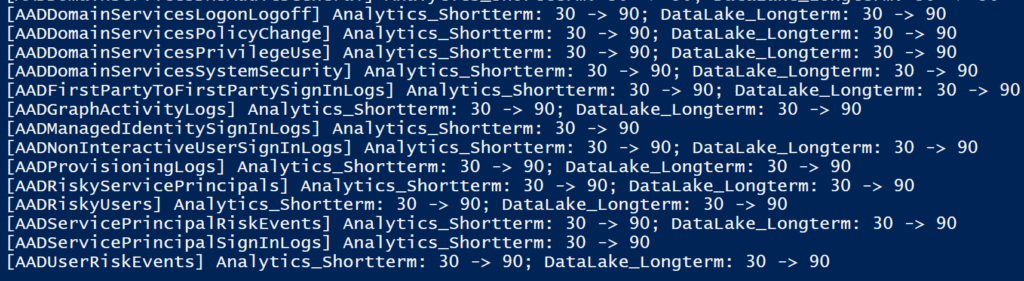
Sentinel’s model is great: keep recent data hot for fast hunting (Analytics Shortterm) and push older data into lower-cost storage (DataLake Longterm). In practice, though, retention is set per table, not just per workspace—and new tables appear constantly.
That creates three recurring pain points:
- Default drift
Many tables land with short analytics windows (often 30 days) even though 90 days is available/desired. Others arrive with different defaults. Over time, your estate becomes a patchwork of mismatched retentions. - Table sprawl
New connectors, new solutions, renamed tables—there’s a steady stream. Yesterday’s configuration is incomplete by next week. Manually chasing these is error-prone and doesn’t scale. - Inconsistent policy enforcement
Compliance might want 180/365/3650 days for some logs; IR wants 90 days hot for investigations. Without automation, some tables never get the long-term setting, while others accidentally exceed policy and cost.
Why it’s hard (the important challenges)
- Per-table reality vs. workspace intent
You can have a tidy policy on paper, but every individual table has its ownAnalyticsandDataLakevalues. One-off fixes don’t hold as new tables arrive. - Constant change
Microsoft and ISV connectors add and evolve tables frequently. What you aligned last month isn’t the full set this month. - Signal diversity
Not all data deserves the same treatment. SecurityEvent vs. SigninLogs vs. high-volume custom logs have different value/cost profiles. You need patterns (e.g.,Device*Events,*_CL) to set sane defaults by family. - Cost & performance trade-offs
Setting every table to long retention can be expensive; keeping everything hot is unnecessary. The trick is a consistent, selective long-term policy while standardizing analytics to a meaningful window. - Risk of accidental data loss
Lowering analytics days can trim older hot data. Changes must be explicit, reviewable, and previewable. - Multi-subscription scale
Large orgs span many subscriptions/tenants. Manual portal clicks won’t cut it; you need idempotent, cross-subscription automation. - Ops safety
You want “make it so”—but only where current ≠ desired. Anything else creates noise and risk.
What “good” looks like
- Standardize Analytics to 90 days for Sentinel tables (where appropriate) so investigators have a meaningful free window.
- Apply DataLake (longterm) selectively by table family or pattern (e.g., 180 for auth, 365/730+ for high-value sources, lighter for noisy custom logs).
- Express policy as code (CSV patterns + script) so new tables are automatically captured on the next run.
- Idempotent enforcement: compare expected vs. actual per table; change only what’s different.
- WhatIf by default: preview the blast radius before applying.
- Auditable output: clear “in-scope / out-of-scope” lists, change summaries, and a CSV artifact for evidence.
How the solution addresses the challenges
- Pattern-based coverage
You can target families (SecurityEvent,Device*Events,*_CL) and TYPE tokens (TYPE:SENTINEL,TYPE:CUSTOM) so new tables match your policy without new lines every time. - Built-in guardrails
The script validates ranges, honors existing plan unless you specify, and supports a safe auto-upgrade (Analytics 30 → 90) for Sentinel tables to avoid under-retention. - Scale & safety
It works across subscriptions/tenants, supports interactive or service-principal login, and is idempotent—only deltas are applied.WhatIfmakes it easy to review before committing. - Operational clarity
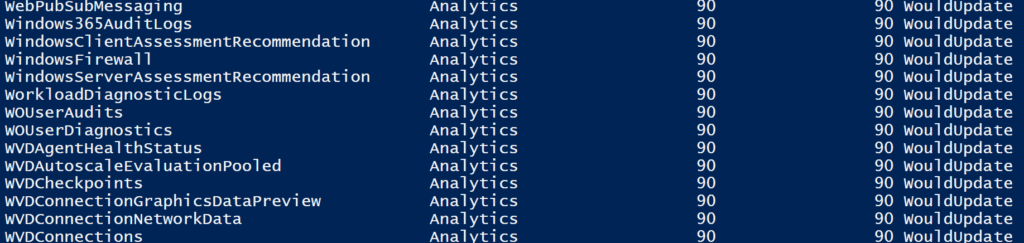
Output starts with out-of-scope tables (so you see what you’re not touching), then shows “Retention Setting after Change” and a detailed “WhatIf Changes” section, plus totals.
The stakes (why this matters)
Future-proofing
As tables proliferate, your policy still applies—without manual rework.
Investigation quality
A consistent 90-day analytics window vastly reduces “we no longer have the data” dead-ends.
Compliance confidence
You can prove which tables are kept longer (and which aren’t), with evidence.
Cost control
Long-term retention is targeted, not accidental; analytics stays hot where it counts, not everywhere.
What I have build
To turn the data-lake promise into day-to-day reality, I built a lightweight, repeatable script (powershell) approach – with lots of scenarios supported.
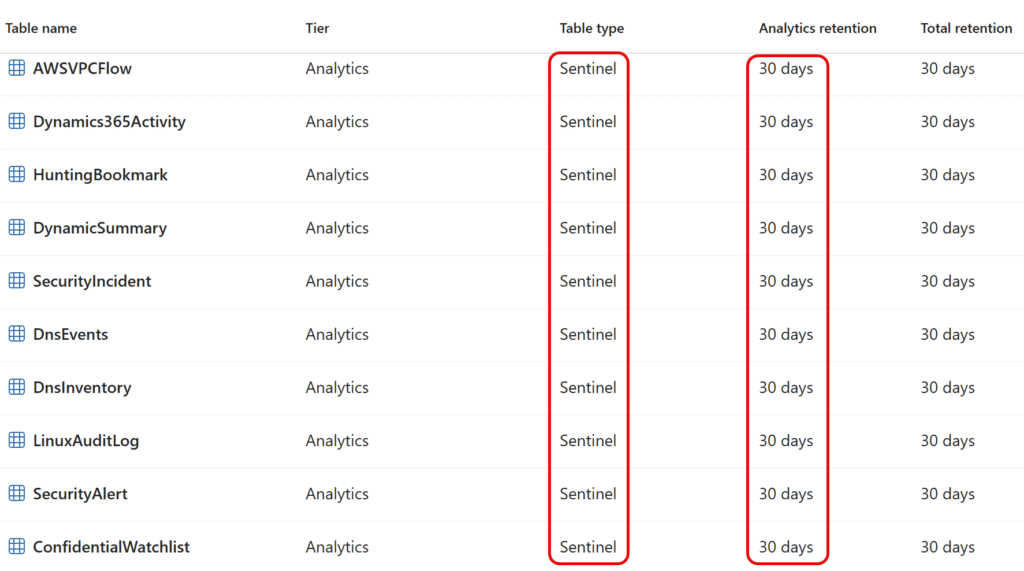
- CSV-driven intent → enforced configuration
Describe target settings once (per table, wildcard, or TYPE token) and the script compares expected vs. actual, changing only what’s different (idempotent). 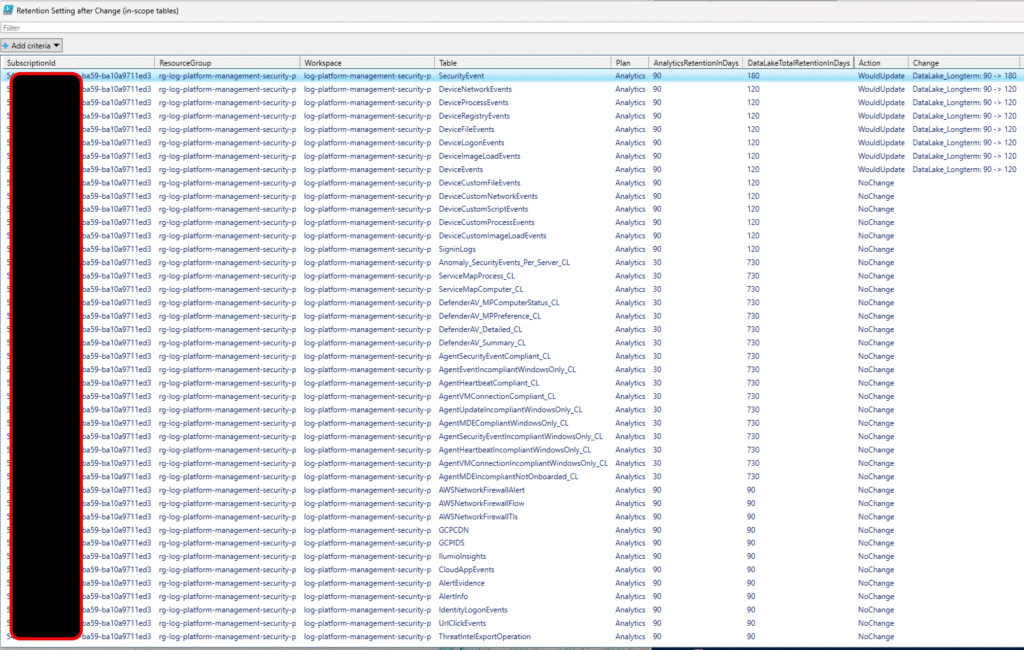
- Positive defaulting for analysts
Automatically upgrades Sentinel tables from 30 → 90 days in Analytics_Shortterm (cost-neutral for Sentinel) while letting you choose DataLake (Longterm) e.g., 180, 365, 3650 days where it truly adds value. 
- Covers the firehose of new tables
Use patterns (Device*Events,*_CL) and TYPE:SENTINEL / TYPE:CUSTOM so that newly introduced tables are captured by policy on the next run—no manual chase. 
- Safe, transparent operations
WhatIfpreviews, grouped workspace headers, clear “would change” vs “no change,” and a CSV export for audit. - Enterprise-ready
Works across subscriptions and tenants, supports interactive or service principal (secret) login, and respects per-table Plan (Analytics/Basic) when you set it.
Bottom line: Sentinel’s data lake gives us the breadth and depth we want – but hopefully by automation we can keep it consistent, compliant, and future-proof as the table landscape keeps growing.
Blog Content (quick links)
- Background: How Sentinel stores & prices data
- Analytics tier (short-term, “hot”)
- Long-term retention (“data lake” / total retention)
- Two states per table
- Maximums
- What the script does?
- Script synopsis (detailed)
- Why this matters (benefits)
- Common rollout scenarios with CSV-file
- Configuration/scoping of tables via CSV-file
- How to implement (quick guide)
- Implementation in WhatIf Mode
- Governance
- Practical tips & gotchas
- Sources (key references)
- Detailed: Script Variables
- Script – Set-Sentinel-Data-Lake-Retentions.ps1
- Scoping/Configuration file (sample)
Background: How Sentinel stores & prices data
Analytics tier (short-term, “hot”)
- Used for day-to-day hunting, analytics rules, and fast queries.
- Analytics tier (short-term) retention can—and should—be set to 90 days. Sentinel includes 90 days of analytics-tier retention at no extra cost; many workspaces are still left at the 30-day default. Moving from 30 → 90 days gives analysts more history without increasing Sentinel costs. Microsoft Learn+2Microsoft Learn+2
- Default in many workspaces is 30 days, but Sentinel includes 90 days free. If you’re still at 30, raising to 90 does not increase Sentinel cost. Microsoft Learn+1
Long-term retention (“data lake” / total retention)
- A lower-cost tier meant for regulatory/audit look-backs and rare investigations.
- Long-term retention is the portion of a table’s total retention that extends beyond its analytics (interactive) retention. By default, most tables keep 30 days in analytics, with no long-term unless you set total retention higher than analytics. You can configure total retention up to 12 years (Portal/API), and analytics up to 730 days. In Microsoft Sentinel, the first 90 days of analytics retention are included at no extra charge; raising analytics from 30 → 90 doesn’t increase Sentinel cost, while any retention beyond 90 days is billed per standard Log Analytics retention pricing.
References: Microsoft’s Sentinel billing guidance confirms 90 days are included at no charge; Log Analytics table defaults are often 30 days unless changed. Microsoft Learn+1
Two states per table
Analytics retention (interactive/hot) and long-term retention (low-cost). Long-term is the period between total retention and analytics retention. Microsoft Learn
Defaults: Most tables default to 30 days analytics; a few have 90-day defaults (for example Usage, AzureActivity, and some App Insights tables). Microsoft Learn
When long-term actually happens: You only get a long-term copy when totalRetentionInDays > retentionInDays. If they’re equal, there’s effectively no long-term period. Microsoft’s example: set analytics to 90 while total remains 180 → data from day 90–180 is kept in long-term. Microsoft Learn
Maximums
- Analytics (interactive) up to 730 days (2 years). Microsoft Learn
- Total retention up to 12 years (Portal/API today; CLI/PowerShell currently limited to 7 years—12-year support “will follow”). Microsoft Learn
What the script does?
The script I have created enforces a data hygiene policy across one or many Sentinel-connected Log Analytics workspaces:
- Reads a CSV with: SubscriptionId, ResourceGroup, Workspace, TablePattern, AnalyticsRetentionDays, DataLakeTotalRetentionInDays, Plan (optional).
- Resolves patterns (
SecurityEvent,Device*Events,*_CL, orTYPE:SENTINEL,TYPE:CUSTOM) to the real tables in each workspace. - Compares current vs. desired settings and updates only when different (idempotent).
- Honors plan if provided (Analytics/Basic), but won’t change plan if you leave it blank.
- Optional auto-upgrade: if a table is treated as “Sentinel” and CSV asks for
30, script automatically targets90(since it’s included) to avoid accidental under-retention. - Multi-subscription aware: switches Azure context safely for each CSV row’s subscription, with either interactive or service principal (secret) login.
- Safety first: run with
-WhatIfto preview; produces clear “in-scope summary,” “what would change,” and totals.
Technical guardrails: Analytics retention per-table must be 4–730 days; “Total retention” (long-term) must be ≥ 0 and greater than Analytics to actually enable long-term storage. These limits follow the Log Analytics table API. Microsoft Learn
Script synopsis (detailed)
NAME
    Set-Sentinel-Data-Lake-Retentions.ps1

SYNOPSIS
    Idempotent per-table retention & plan manager for Microsoft Sentinel / Log Analytics workspaces.
    Reads desired settings from a CSV and applies them only when different, with a WhatIf-safe dry run.

WHAT COUNTS AS “SENTINEL” HERE?
    Per your requirement: **if a table exists in the Log Analytics workspace, and the workspace is connected
    to Sentinel, it is treated as a Sentinel table**—except **Custom** tables, which the UI shows as “Custom”.
    We therefore classify:
      • Sentinel  = every Log Analytics table that is NOT Custom
      • Custom    = schema.tableType = CustomLog  (or name like *_CL)
      • XDR       = ignored (does not exist in Log Analytics; only in Defender) — TYPE:XDR returns none

DESCRIPTION
    - Multi-subscription / multi-tenant via per-row SubscriptionId.
    - Wildcard pattern matching (* and ?) for table names.
    - Supports special TYPE filters in CSV:
        TYPE:SENTINEL              → all LA tables that are NOT Custom
        TYPE:SENTINEL:ANALYTICS    → same, but Plan = Analytics
        TYPE:CUSTOM                → all CustomLog tables (e.g., *_CL)
        TYPE:XDR                   → (empty by design; XDR isn’t in LA)
    - Idempotent: only updates when values differ.
    - Optional plan changes per table (Analytics/Basic) if provided.
    - Optional auto-upgrade: Sentinel tables with CSV=30 → 90 days Analytics.
    - Coverage report (UNMATCHED printed first; full bulleted lists), compact matched summary,
      and detailed “WhatIf/Changes” section.
    - Exports a CSV of the full run.

CSV FORMAT
    Required columns:
      SubscriptionId,ResourceGroup,Workspace,TablePattern,AnalyticsRetentionDays,DataLakeTotalRetentionInDays
    Optional:
      Plan  (Analytics | Basic) — blank to keep current.

    TablePattern can be a wildcard or a TYPE token:
      Examples:
        SecurityEvent
        Device*Events
        *_CL
        *
        TYPE:SENTINEL
        TYPE:SENTINEL:ANALYTICS
        TYPE:CUSTOM
        TYPE:XDR  # returns none (by design)

EXAMPLE CSV
    SubscriptionId,ResourceGroup,Workspace,TablePattern,AnalyticsRetentionDays,DataLakeTotalRetentionInDays,Plan
    00000000-0000-0000-0000-000000000000,rg,ws,TYPE:SENTINEL:ANALYTICS,90,365,Analytics
    00000000-0000-0000-0000-000000000000,rg,ws,SecurityEvent,90,180,Analytics
    00000000-0000-0000-0000-000000000000,rg,ws,*_CL,30,730,Analytics

AUTO-UPGRADE (OPTIONAL)
    $AutoUpgradeSentinelAnalyticsFrom30To90 = $true :
      For **Sentinel** tables (i.e., not Custom), if CSV asks for 30 days, target becomes 90.
    $AutoUpgradeSentinelAnalyticsFrom30To90 = $false :
      CSV value is respected.

OUTPUT ORDER
    1) Out-of-Scope tables (no match) — grouped by workspace header
    2) Retention Setting after Change (in-scope tables) — grouped by workspace header
    3) Retention Setting WhatIf Changes (in-scope tables) — grouped by workspace header

USAGE
    • Run with static defaults (no params):  .\Set-Sentinel-Data-Lake-Retentions.ps1
    • Actually apply changes:                .\Set-Sentinel-Data-Lake-Retentions.ps1 -WhatIf:$false
    • Verbose logging:                       .\Set-Sentinel-Data-Lake-Retentions.ps1 -Verbose
Why this matters (benefits)
- Operational effectiveness: 90-day analytics history improves investigations and reduces “we don’t have the data anymore” moments—without adding SIEM cost. Microsoft Learn+1
- Compliance & audit: Long-term retention (180 days, 1 year, 7 years, etc.) supports regulatory evidence needs. Microsoft Learn
- Cost control: You decide which tables get long-term retention. Defaulting to 30 days everywhere leaves value on the table; raising analytics to 90 (included) costs the same, while long-term retention is applied selectively where it’s worth it. Microsoft Learn
Common rollout scenarios with CSV-file
In all examples below, increasing Analytics from 30 → 90 days is cost-neutral for Sentinel and recommended. Microsoft Learn+1
Scenario A — Baseline all Sentinel tables at 90/180
- Goal: Give analysts 90 days hot, keep a 6-month total copy.
- CSV pattern:
TYPE:SENTINEL(covers non-custom tables) - Example row:
… , TYPE:SENTINEL, 90, 180, Analytics
Scenario B — Keep Custom tables lightweight (30/730)
- Goal: Control spend on ad-hoc custom ingestion while still keeping a year+ history.
- CSV pattern:
*_CLorTYPE:CUSTOM - Example row:
… , *_CL, 30, 730, Analytics
Scenario C — Only bump Analytics to 90; don’t enable long-term
- Goal: Maximize “free” analytics window, skip extra long-term storage for now.
- CSV: set AnalyticsRetentionDays=90 and DataLakeTotalRetentionInDays=90 (so total equals analytics → no long-term layer). Microsoft Learn
Scenario D — Fine-grain per data family
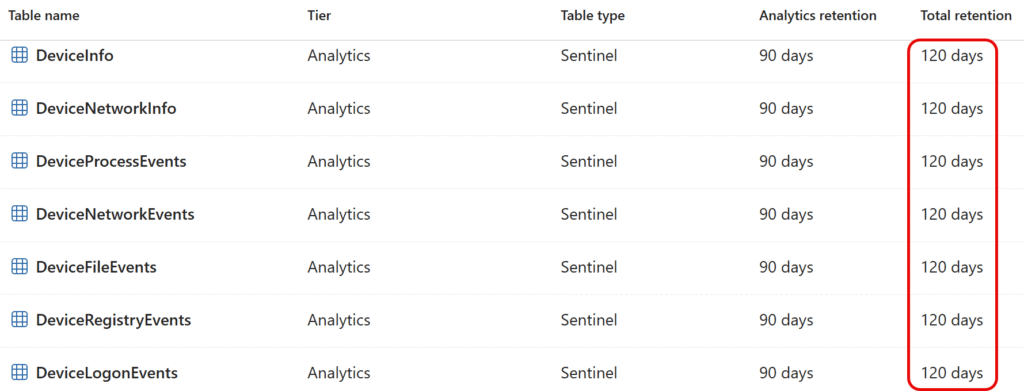
- Goal: Differentiate retention by signal (e.g.,
SecurityEvent90/365;SigninLogs90/90; DefenderDevice*Events90/120). - CSV patterns:
SecurityEvent,SigninLogs,Device*Eventsas separate lines.
Scenario E — Respect current plan; only change retention
- Goal: Avoid changing Analytics/Basic plan state; just adjust days.
- CSV: leave Plan blank to keep each table’s current plan.
Scenario F — Multi-subscription enforcement
- Goal: Consistent retention across prod/dev subscriptions.
- CSV: one row per workspace with its SubscriptionId; script switches context per group.
Configuration/scoping of tables via CSV-file
Scenario #1 – Use Table name filtering (*, ?)
SubscriptionId,ResourceGroup,Workspace,TablePattern,AnalyticsRetentionDays,DataLakeTotalRetentionInDays,Plan
<subid>,<rg>,<ws name>,SecurityEvent,90,180,Analytics
<subid>,<rg>,<ws name>,Device*Events,90,120,Analytics
<subid>,<rg>,<ws name>,SigninLogs,90,120,Analytics
<subid>,<rg>,<ws name>,*_CL,30,730,Analytics
Scenario #2 - Use Default Settings for all Sentinel tables
Scenario #2 – Use Default Settings for all Sentinel tables
SubscriptionId,ResourceGroup,Workspace,TablePattern,AnalyticsRetentionDays,DataLakeTotalRetentionInDays,Plan
<subid>,<rg>,<ws name>,TYPE:SENTINEL:ANALYTICS,90,90,Analytics
Implementation in WhatIf Mode
.\Set-Sentinel-Data-Lake-Retentions.ps1 -WhatIf:$true
- Shows “Out-of-scope,” “Retention Setting after Change,” and “WhatIf Changes.”
What if: Performing the operation "[54468121-98ba-48ba-ba59-ba10a9711ed3/rg-log-platform-management-security-p/log-platform-management-security-p][SecurityRegulatoryCompliance] Analytics_Shortterm: 30 -> 90; DataLake_Lon
gterm: 30 -> 90" on target "SecurityRegulatoryCompliance".
[WHATIF]Would update 'SecurityRegulatoryCompliance' → Analytics_Shortterm: 30 -> 90; DataLake_Longterm: 30 -> 90
[INFO]  Table 'SecurityRecommendation' current: Plan=Analytics Analytics_Shortterm=30 DataLake_Longterm=30; target: Plan=Analytics Analytics_Shortterm=90 DataLake_Longterm=90
What if: Performing the operation "[54468121-98ba-48ba-ba59-ba10a9711ed3/rg-log-platform-management-security-p/log-platform-management-security-p][SecurityRecommendation] Analytics_Shortterm: 30 -> 90; DataLake_Longterm:
 30 -> 90" on target "SecurityRecommendation".
[WHATIF]Would update 'SecurityRecommendation' → Analytics_Shortterm: 30 -> 90; DataLake_Longterm: 30 -> 90
[INFO]  Table 'SecurityBaselineSummary' current: Plan=Analytics Analytics_Shortterm=30 DataLake_Longterm=30; target: Plan=Analytics Analytics_Shortterm=90 DataLake_Longterm=90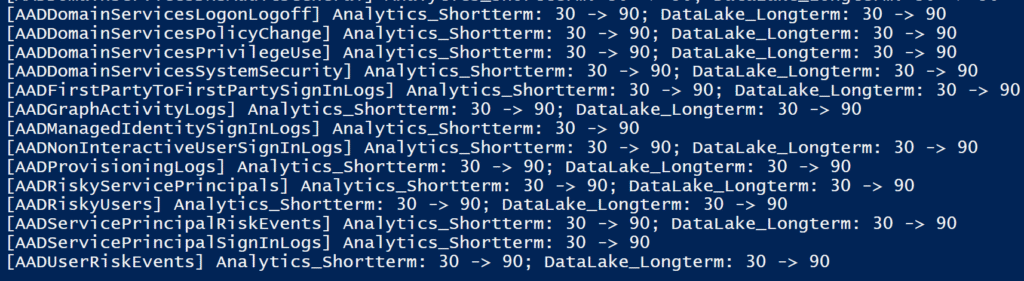
Governance
- Re-run monthly/quarterly to catch drift or new tables.
- Keep the CSV in version control; PR review doubles as a cost/compliance review.
- Consider a pipeline (e.g., GitHub Actions/DevOps) with a
-WhatIfstage before approval.
Practical tips & gotchas
- Lowering retention can purge older data. Increasing (e.g., 30 → 90) is safe; decreasing may remove data older than the new window. Plan changes carefully.
- “Total retention” must be > Analytics to actually create a long-term copy; 90/90 means no separate data-lake layer. Microsoft Learn
- Per-table limits: Analytics retention range is 4–730 days via the API; enforceable by the script. Microsoft Learn
- Defaults vary by table: While many tables default to 30 days, some Microsoft-solution tables may default to 90; the script compares actuals and will only change what’s needed. Microsoft Learn
- What’s “Sentinel table”? In practice: any table in a Sentinel-connected workspace that isn’t Custom (
*_CL). The script treats those as in-scope for the 30 → 90 auto-upgrade.
Sources (key references)
Sentinel data lake overview (concept). Microsoft Learn
Sentinel billing & retention: 90-day analytics included. Microsoft Learn+1
Default retention behavior in Log Analytics: many tables at 30 days by default. Microsoft Learn
Sentinel data tiers, defaults, and 90-day extension at no cost for Sentinel solution tables. Microsoft Learn
Table-level retention API limits and semantics. Microsoft Learn
Total (long-term) retention behavior and example (90 → 180). Microsoft Learn
Script Variables
# ---------- STATIC DEFAULTS ----------
$DefaultCsvPath  = "C:\xxxxxx\Sentinel-Data-Lake-Retention\Sentinel-Data-Lake-Retentions.csv"
$DefaultTenantId = "<tenant id>"
$DefaultWhatIf   = $true

# ---------- LOGIN SETTINGS ----------
# Choose one:
#   "Interactive"            → opens browser sign-in (no device code used)
#   "ServicePrincipalSecret" → uses Client ID + Secret below
$LoginMode           = "Interactive"
$ForceLoginAtStart   = $true   # prompt at start even if a context exists

# Service principal secret creds (used only when $LoginMode = "ServicePrincipalSecret")
$SpnTenantId         = $DefaultTenantId      # override per your SPN tenant if different
$SpnClientId         = "<APP/CLIENT ID GUID>"
$SpnClientSecret     = "<CLIENT SECRET VALUE>"  # load from secure store in production

# Auto-upgrade (CSV 30 -> force 90) for Sentinel tables (non-Custom)
$AutoUpgradeSentinelAnalyticsFrom30To90 = $true

# Include NoChange rows in final summary table/CSV
$IncludeNoChangeInSummary = $true

# ---------- READABILITY/OUTPUT TUNING ----------
$DefaultSummaryCsvPath = "C:\xxxxxx\Sentinel-Data-Lake-Retention\retention-summary_{date}.csv"
$EnableOutGridView     = $true
$ConsoleBufferWidth    = 220
$MaxRG = 30; $MaxWS = 30; $MaxTable = 42
Script – Set-Sentinel-Data-Lake-Retentions.ps1
# ====================================================================================================
# Developed by Microsoft MVP, Morten Knudsen (aka.ms/morten - mok@mortenknudsen.net)
#
# NAME
#     Set-Sentinel-Data-Lake-Retentions.ps1
#
# SYNOPSIS
#     Idempotent per-table retention & plan manager for Microsoft Sentinel / Log Analytics workspaces.
#     Reads desired settings from a CSV and applies them only when different, with a WhatIf-safe dry run.
#
# WHAT COUNTS AS “SENTINEL” HERE?
#     If a table exists in the Log Analytics workspace and the workspace is connected to Sentinel,
#     it is treated as a Sentinel table—except Custom tables (schema.tableType = CustomLog or *_CL).
#
# DESCRIPTION (abridged)
#     - Multi-subscription/tenant via per-row SubscriptionId.
#     - Wildcards (* ?) for table names and TYPE filters: TYPE:SENTINEL, TYPE:SENTINEL:ANALYTICS, TYPE:CUSTOM, TYPE:XDR.
#     - Auto-upgrade option: Sentinel tables with CSV=30 → 90 days Analytics.
#     - Coverage report, compact matched summary, and detailed WhatIf/Changes.
#     - Exports a CSV summary of the full run.
#     - **Precedence-based application: exact name > wildcard > TYPE:*** (prevents broad rows from overriding specific ones).
#
# CSV FORMAT (required)
#     SubscriptionId,ResourceGroup,Workspace,TablePattern,AnalyticsRetentionDays,DataLakeTotalRetentionInDays
#     Optional: Plan (Analytics|Basic)
#
# USAGE
#     • Dry run w/ static defaults: .\Set-Sentinel-Data-Lake-Retentions.ps1
#     • Apply changes:              .\Set-Sentinel-Data-Lake-Retentions.ps1 -WhatIf:$false
#     • Verbose:                    .\Set-Sentinel-Data-Lake-Retentions.ps1 -Verbose
# ====================================================================================================

# ---------- STATIC DEFAULTS ----------
$DefaultCsvPath  = "C:\xxxxxx\Sentinel-Data-Lake-Retention\Sentinel-Data-Lake-Retentions.csv"
$DefaultTenantId = "<tenant id>"
$DefaultWhatIf   = $true

# ---------- LOGIN SETTINGS ----------
# Choose one:
#   "Interactive"            → opens browser sign-in (no device code used)
#   "ServicePrincipalSecret" → uses Client ID + Secret below
$LoginMode           = "Interactive"
$ForceLoginAtStart   = $true   # prompt at start even if a context exists

# Service principal secret creds (used only when $LoginMode = "ServicePrincipalSecret")
$SpnTenantId         = $DefaultTenantId      # override per your SPN tenant if different
$SpnClientId         = "<APP/CLIENT ID GUID>"
$SpnClientSecret     = "<CLIENT SECRET VALUE>"  # load from secure store in production

# Auto-upgrade (CSV 30 -> force 90) for Sentinel tables (non-Custom)
$AutoUpgradeSentinelAnalyticsFrom30To90 = $true

# Include NoChange rows in final summary table/CSV
$IncludeNoChangeInSummary = $true

# ---------- READABILITY/OUTPUT TUNING ----------
$DefaultSummaryCsvPath = "C:\xxxxxx\Sentinel-Data-Lake-Retention\retention-summary_{date}.csv"
$EnableOutGridView     = $true
$ConsoleBufferWidth    = 220
$MaxRG = 30; $MaxWS = 30; $MaxTable = 42
# ----------------------------------------------


# ---------- Output helpers ----------
function Write-Step([string]$msg) { Write-Host ("[STEP]  {0}" -f $msg) }
function Write-Info([string]$msg) { Write-Host ("[INFO]  {0}" -f $msg) }
function Write-Done([string]$msg) { Write-Host ("[DONE]  {0}" -f $msg) }
function Write-Act ([string]$msg) { Write-Host ("[APPLY] {0}" -f $msg) }
function Write-Sim ([string]$msg) { Write-Host ("[WHATIF]{0}" -f $msg) }
function Write-Skip([string]$msg) { Write-Host ("[SKIP]  {0}" -f $msg) }
function Write-Err ([string]$msg) { Write-Host ("[ERROR] {0}" -f $msg); Write-Warning $msg }

function Ensure-Module {
  param([string]$Name)
  if (-not (Get-Module -ListAvailable -Name $Name)) {
    Write-Step ("Installing module $($Name)...")
    Install-Module $Name -Scope CurrentUser -Force -AllowClobber
    Write-Done ("Installed module $($Name).")
  }
  Import-Module $Name -ErrorAction Stop
  Write-Info ("Imported module $($Name).")
}

function Ensure-SubscriptionContext {
  param([string]$SubscriptionId)

  $ctx = Get-AzContext
  if ($ctx -and $ctx.Subscription -and $ctx.Subscription.Id -eq $SubscriptionId) {
    Write-Info ("Already in subscription context $($SubscriptionId).")
    return $true
  }

  try {
    Write-Step ("Setting context to subscription $($SubscriptionId)")
    Set-AzContext -Subscription $SubscriptionId -ErrorAction Stop | Out-Null
    Write-Done ("Context set to $($SubscriptionId).")
    return $true
  } catch {
    Write-Info ("Set-AzContext failed for $($SubscriptionId): $($_)")
    try {
      $subInfo   = Get-AzSubscription -SubscriptionId $SubscriptionId -ErrorAction Stop
      $subTenant = $subInfo.TenantId
      if (-not $subTenant) { throw "TenantId not found for subscription $($SubscriptionId)" }

      Write-Step ("Cross-tenant login to Tenant=$($subTenant) for Subscription=$($SubscriptionId)")
      Invoke-AzLogin -TenantToUse $subTenant

      Write-Step ("Retry Set-AzContext to subscription $($SubscriptionId)")
      Set-AzContext -Subscription $SubscriptionId -ErrorAction Stop | Out-Null
      Write-Done ("Context set to $($SubscriptionId) after cross-tenant login.")
      return $true
    } catch {
      Write-Err ("Cannot set context to subscription $($SubscriptionId): $($_)")
      return $false
    }
  }
}


function Get-WorkspaceTables {
  param([string]$ResourceGroupName,[string]$WorkspaceName)
  Write-Info ("Fetching tables for RG='$($ResourceGroupName)' WS='$($WorkspaceName)' ...")
  $result = Get-AzOperationalInsightsTable -ResourceGroupName $ResourceGroupName -WorkspaceName $WorkspaceName
  Write-Done ("Fetched $(@($result).Count) tables.")
  return $result
}

function Normalize-RequestedName {
  param([string]$Name)
  switch -Regex ($Name) { '^SecurityEvents$' { 'SecurityEvent'; break } default { $Name } }
}

function Convert-WildcardToRegex { param([string]$Pattern) $Pattern -replace '\.', '\.' -replace '\*', '.*' -replace '\?', '.' }

# --- helpers to read nested schema props safely ---
function Get-TableSchemaProp {
  param([object]$Table,[string]$PropName)
  if ($Table.PSObject.Properties['Schema'] -and $Table.Schema.PSObject.Properties[$PropName]) { return $Table.Schema.$PropName }
  if ($Table.PSObject.Properties['Properties'] -and $Table.Properties.PSObject.Properties['Schema'] -and $Table.Properties.Schema.PSObject.Properties[$PropName]) { return $Table.Properties.Schema.$PropName }
  return $null
}

# CLASSIFICATION:
# - Custom   = schema.tableType == 'CustomLog' OR name like *_CL (case-insensitive)
# - Sentinel = NOT Custom  (everything that exists in LA and is not Custom)
function Test-IsCustomTable {
  param([object]$Table)
  $tt = Get-TableSchemaProp -Table $Table -PropName 'TableType'
  if ($tt -and $tt -eq 'CustomLog') { return $true }
  if ($Table.Name -match '(?i)_CL$') { return $true }
  return $false
}

function Test-IsSentinelTable {
  param([object]$Table)
  return -not (Test-IsCustomTable -Table $Table)
}

# --- Login helper (Interactive or Service Principal Secret; no device code) ---
function Invoke-AzLogin {
  param([string]$TenantToUse)
  $t = if ([string]::IsNullOrWhiteSpace($TenantToUse)) { $DefaultTenantId } else { $TenantToUse }

  if ($LoginMode -eq "ServicePrincipalSecret") {
    if ([string]::IsNullOrWhiteSpace($SpnClientId) -or [string]::IsNullOrWhiteSpace($SpnClientSecret) -or [string]::IsNullOrWhiteSpace($SpnTenantId)) {
      throw "ServicePrincipalSecret login selected but SPN variables are missing."
    }
    Write-Step ("Logging in as Service Principal (ClientId=$($SpnClientId)) to Tenant=$($t)")
    $sec = ConvertTo-SecureString $SpnClientSecret -AsPlainText -Force
    $cred = New-Object System.Management.Automation.PSCredential($SpnClientId, $sec)
    Connect-AzAccount -ServicePrincipal -Tenant $t -Credential $cred -ErrorAction Stop | Out-Null
    Write-Done ("Logged in (SPN).")
  }
  else {
    Write-Step ("Interactive login to Tenant=$($t)")
    Connect-AzAccount -Tenant $t -ErrorAction Stop | Out-Null
    Write-Done ("Logged in (Interactive).")
  }
}

# ---------- NEW: Pattern specificity scoring (exact > wildcard > TYPE:*) ----------
function Get-PatternSpecificity {
  param([string]$Pattern, [string]$ResolvedPattern)

  if ($ResolvedPattern -match '^(?i)\s*TYPE\s*:\s*') { return 100 }  # lowest class

  $stars = ($ResolvedPattern.ToCharArray() | Where-Object { $_ -eq '*' }).Count
  $qs    = ($ResolvedPattern.ToCharArray() | Where-Object { $_ -eq '?' }).Count
  $hasWild = ($stars + $qs) -gt 0

  if (-not $hasWild) { return 1000 } # exact table name

  # wildcards: fewer wildcards is more specific
  return 600 - ( ($stars * 10) + ($qs * 5) )
}

# ---------- Updated matcher: returns Matches + Resolved pattern ----------
function Match-TablesByPattern {
  param([System.Collections.Generic.List[object]]$AllTables,[string]$Pattern)

  $norm = Normalize-RequestedName $Pattern

  if ($norm -match '^(?i)\s*TYPE\s*:\s*SENTINEL\s*(?::\s*ANALYTICS\s*)?$') {
    $onlyAnalytics = ($norm -match '(?i):\s*ANALYTICS')
    Write-Info ("Pattern '$($Pattern)' resolved to TYPE:SENTINEL (onlyAnalytics=$($onlyAnalytics))")
    $ts = $AllTables | Where-Object { Test-IsSentinelTable -Table $_ }
    if ($onlyAnalytics) { $ts = $ts | Where-Object { $_.Plan -eq 'Analytics' } }
    Write-Done ("TYPE:SENTINEL matched $(@($ts).Count) tables.")
    return [pscustomobject]@{ Matches=$ts; Resolved=$norm }
  }
  if ($norm -match '^(?i)\s*TYPE\s*:\s*CUST(OM)?\s*$') {
    Write-Info ("Pattern '$($Pattern)' resolved to TYPE:CUSTOM")
    $ts = $AllTables | Where-Object { Test-IsCustomTable -Table $_ }
    Write-Done ("TYPE:CUSTOM matched $(@($ts).Count) tables.")
    return [pscustomobject]@{ Matches=$ts; Resolved=$norm }
  }
  if ($norm -match '^(?i)\s*TYPE\s*:\s*XDR\s*$') {
    Write-Info ("Pattern '$($Pattern)' resolved to TYPE:XDR (not in LA) → 0 matches by design")
    return [pscustomobject]@{ Matches=@(); Resolved=$norm }
  }

  $regex = '^' + (Convert-WildcardToRegex $norm) + '$'
  Write-Info ("Pattern '$($Pattern)' -> regex '$($regex)'")
  $ts = $AllTables | Where-Object { $_.Name -match $regex }
  Write-Done ("Wildcard matched $(@($ts).Count) tables for pattern '$($Pattern)'.")
  return [pscustomobject]@{ Matches=$ts; Resolved=$norm }
}

# ---- Readability helpers ----
function Shorten([string]$s,[int]$max){
  if ([string]::IsNullOrEmpty($s)) { return $s }
  if ($s.Length -le $max) { return $s }
  return ($s.Substring(0,[Math]::Max(1,$max-1)) + '…')
}

# ---------------- MAIN ADVANCED FUNCTION ----------------
function Set-SentinelDataLakeRetentions {
  [CmdletBinding(SupportsShouldProcess = $true)]
  param([string]$CsvPath,[string]$TenantId)

  Write-Step ("Starting Set-SentinelDataLakeRetentions")
  Write-Info ("Defaults: CsvPath='$($DefaultCsvPath)', TenantId='$($DefaultTenantId)', DefaultWhatIf=$($DefaultWhatIf)")
  Write-Info ("LoginMode='$($LoginMode)', ForceLoginAtStart=$($ForceLoginAtStart)")

  if ($ConsoleBufferWidth -and $Host.UI -and $Host.UI.RawUI) {
    try {
      $raw = $Host.UI.RawUI
      $cur = $raw.BufferSize
      if ($cur.Width -lt $ConsoleBufferWidth) {
        Write-Info ("Increasing console buffer width to $($ConsoleBufferWidth)")
        $raw.BufferSize = New-Object Management.Automation.Host.Size ($ConsoleBufferWidth, [Math]::Max($cur.Height,5000))
      }
    } catch {
      Write-Info ("Console resize skipped: $($_)")
    }
  }

  if (-not $CsvPath)  { $CsvPath  = $DefaultCsvPath }
  if (-not $TenantId) { $TenantId = $DefaultTenantId }
  if (-not $PSBoundParameters.ContainsKey('WhatIf') -and $DefaultWhatIf) { $WhatIfPreference = $true }

  try {
    Ensure-Module -Name Az.Accounts
    Ensure-Module -Name Az.OperationalInsights
  } catch {
    Write-Err ("Failed to load Az modules: $($_)")
    return
  }

  if (-not (Test-Path $CsvPath)) { Write-Err ("CSV not found: $($CsvPath)"); return }

  try {
    if ($ForceLoginAtStart -or -not (Get-AzContext)) {
      Invoke-AzLogin -TenantToUse $TenantId
    } else {
      Write-Info ("Using existing Az context.")
    }
  } catch {
    Write-Err ("Azure login failed: $($_)")
    return
  }

  Write-Step ("Loading CSV from '$($CsvPath)'")
  $rows = Import-Csv -Path $CsvPath
  if (-not $rows) { Write-Err ("CSV is empty."); return }
  Write-Done ("Loaded $(@($rows).Count) CSV rows.")
  foreach ($r in $rows) {
    if ([string]::IsNullOrWhiteSpace($r.SubscriptionId)) { Write-Err ("Row with Workspace '$($r.Workspace)' is missing SubscriptionId."); return }
  }

  $groups   = $rows | Group-Object SubscriptionId, ResourceGroup, Workspace
  Write-Info ("CSV grouped into $(@($groups).Count) workspace scopes.")
  $summary  = @()
  $coverage = @()

  foreach ($g in $groups) {
    $sub, $rg, $ws = $g.Name -split ',\s*'
    Write-Step ("Scope: Sub='$($sub)' RG='$($rg)' WS='$($ws)'  (rows=$(@($g.Group).Count))")

    if (-not (Ensure-SubscriptionContext -SubscriptionId $sub)) {
      foreach ($row in $g.Group) {
        $summary += [pscustomobject]@{ SubscriptionId=$sub; ResourceGroup=$rg; Workspace=$ws; Table=$row.TablePattern; Plan=$null; AnalyticsRetentionInDays=$null; DataLakeTotalRetentionInDays=$null; Action="Error(SetContext)"; Change=$null }
      }
      continue
    }

    try { $tables = Get-WorkspaceTables -ResourceGroupName $rg -WorkspaceName $ws }
    catch {
      Write-Err ("Could not list tables for $($rg)/$($ws) in $($sub): $($_)")
      foreach ($row in $g.Group) {
        $summary += [pscustomobject]@{ SubscriptionId=$sub; ResourceGroup=$rg; Workspace=$ws; Table=$row.TablePattern; Plan=$null; AnalyticsRetentionInDays=$null; DataLakeTotalRetentionInDays=$null; Action="Error(GetTables)"; Change=$null }
      }
      continue
    }

    $totalTables  = @($tables).Count
    $matchedNames = New-Object System.Collections.Generic.HashSet[string]
    Write-Info ("Scope has $($totalTables) tables in workspace.")

    # ---------- DECISION PASS (build winners per table) ----------
    $desiredByTable = @{}   # tableName -> @{ TargetPlan=..; TargetHot=..; TargetDL=..; Score=..; FromPattern=.. }

    foreach ($row in $g.Group) {
      $pattern   = $row.TablePattern
      $planIn    = $row.Plan
      $retHotCsv = [int]$row.AnalyticsRetentionDays

      # Data Lake: preferred + fallbacks
      $dlStr = $row.DataLakeTotalRetentionInDays
      if ([string]::IsNullOrWhiteSpace($dlStr)) { $dlStr = $row.DataLakeRetentionDays }
      if ([string]::IsNullOrWhiteSpace($dlStr)) { $dlStr = $row.TotalRetentionDays }
      if ([string]::IsNullOrWhiteSpace($dlStr)) {
        Write-Skip ("Missing DataLakeTotalRetentionInDays for pattern '$($pattern)' → Skipping row.")
        $summary += [pscustomobject]@{ SubscriptionId=$sub; ResourceGroup=$rg; Workspace=$ws; Table=$pattern; Plan=$planIn; AnalyticsRetentionInDays=$retHotCsv; DataLakeTotalRetentionInDays=$null; Action="Skipped(DataLakeMissing)"; Change=$null }
        continue
      }
      $retDataLakeCsv = [int]$dlStr

      if ($retHotCsv -lt 4 -or $retHotCsv -gt 730) {
        Write-Skip ("AnalyticsRetentionDays '$($retHotCsv)' out-of-range (4..730) → Skipping row.")
        $summary += [pscustomobject]@{ SubscriptionId=$sub; ResourceGroup=$rg; Workspace=$ws; Table=$pattern; Plan=$planIn; AnalyticsRetentionInDays=$retHotCsv; DataLakeTotalRetentionInDays=$retDataLakeCsv; Action="Skipped(HotOutOfRange)"; Change=$null }
        continue
      }
      if ($retDataLakeCsv -lt 0) {
        Write-Skip ("DataLakeTotalRetentionInDays '$($retDataLakeCsv)' invalid (<0) → Skipping row.")
        $summary += [pscustomobject]@{ SubscriptionId=$sub; ResourceGroup=$rg; Workspace=$ws; Table=$pattern; Plan=$planIn; AnalyticsRetentionInDays=$retHotCsv; DataLakeTotalRetentionInDays=$retDataLakeCsv; Action="Skipped(DataLakeInvalid)"; Change=$null }
        continue
      }

      $matchObj = Match-TablesByPattern -AllTables ([System.Collections.Generic.List[object]]$tables) -Pattern $pattern
      $matches  = @($matchObj.Matches)
      $resolved = $matchObj.Resolved

      if (-not $matches -or $matches.Count -eq 0) {
        Write-Skip ("No tables matched pattern '$($pattern)'.")
        $summary += [pscustomobject]@{ SubscriptionId=$sub; ResourceGroup=$rg; Workspace=$ws; Table=$pattern; Plan=$planIn; AnalyticsRetentionInDays=$retHotCsv; DataLakeTotalRetentionInDays=$retDataLakeCsv; Action="NoMatch"; Change=$null }
        continue
      }

      $score = Get-PatternSpecificity -Pattern $pattern -ResolvedPattern $resolved
      foreach ($t in $matches) {
        [void]$matchedNames.Add($t.Name)

        $isSentinel = Test-IsSentinelTable -Table $t
        $targetHot  = $retHotCsv
        if ($AutoUpgradeSentinelAnalyticsFrom30To90 -and $isSentinel -and $retHotCsv -eq 30) {
          $targetHot = 90
        }

        # record candidate (Plan only if provided; otherwise keep null -> means "keep current plan")
        $candidate = @{
          TargetPlan = if ([string]::IsNullOrWhiteSpace($planIn)) { $null } else { $planIn }
          TargetHot  = $targetHot
          TargetDL   = $retDataLakeCsv
          Score      = $score
          FromPattern= $resolved
        }

        if (-not $desiredByTable.ContainsKey($t.Name)) {
          $desiredByTable[$t.Name] = $candidate
        } else {
          # keep the more specific (higher score). On tie, keep existing.
          if ($candidate.Score -gt $desiredByTable[$t.Name].Score) {
            $desiredByTable[$t.Name] = $candidate
          }
        }
      }
    }

    # ---------- APPLY PASS (compare/apply once per table) ----------
    foreach ($t in ($tables | Sort-Object Name)) {
      $currentPlan     = $t.Plan
      $currentHot      = [int]$t.RetentionInDays
      $currentDataLake = [int]$t.TotalRetentionInDays

      if (-not $desiredByTable.ContainsKey($t.Name)) { continue } # out-of-scope (covered later)

      $desired = $desiredByTable[$t.Name]
      $targetPlan = if ($null -ne $desired.TargetPlan) { $desired.TargetPlan } else { $currentPlan }
      $targetHot  = $desired.TargetHot
      $targetDL   = $desired.TargetDL

      $needPlanChange     = ($targetPlan -ne $currentPlan)
      $needHotChange      = ($targetHot  -ne $currentHot)
      $needDataLakeChange = ($targetDL   -ne $currentDataLake)

      Write-Info ("Table '$($t.Name)' current: Plan=$($currentPlan) Analytics_Shortterm=$($currentHot) DataLake_Longterm=$($currentDataLake); target (from '$($desired.FromPattern)'): Plan=$($targetPlan) Analytics_Shortterm=$($targetHot) DataLake_Longterm=$($targetDL)")

      if (-not ($needPlanChange -or $needHotChange -or $needDataLakeChange)) {
        Write-Info ("No change required for '$($t.Name)'.")
        if ($IncludeNoChangeInSummary) {
          $summary += [pscustomobject]@{
            SubscriptionId=$sub; ResourceGroup=$rg; Workspace=$ws; Table=$t.Name; Plan=$currentPlan;
            AnalyticsRetentionInDays=$currentHot; DataLakeTotalRetentionInDays=$currentDataLake;
            Action="NoChange"; Change=$null
          }
        }
        continue
      }

      $changeDesc = @()
      if ($needPlanChange)     { $changeDesc += "Plan: $($currentPlan) -> $($targetPlan)" }
      if ($needHotChange)      { $changeDesc += "Analytics_Shortterm: $($currentHot) -> $($targetHot)" }
      if ($needDataLakeChange) { $changeDesc += "DataLake_Longterm: $($currentDataLake) -> $($targetDL)" }
      $changeText = $changeDesc -join '; '
      $msg = "[$($sub)/$($rg)/$($ws)][$($t.Name)] $($changeText)"

      if ($PSCmdlet.ShouldProcess($t.Name, $msg)) {
        try {
          Write-Act ("Updating '$($t.Name)' with: $($changeText)")
          $args = @{ ResourceGroupName=$rg; WorkspaceName=$ws; TableName=$t.Name }
          if ($needPlanChange)     { $args['Plan'] = $targetPlan }
          if ($needHotChange)      { $args['RetentionInDays'] = $targetHot }
          if ($needDataLakeChange) { $args['TotalRetentionInDays'] = $targetDL }
          Update-AzOperationalInsightsTable @args | Out-Null
          Write-Done ("Updated '$($t.Name)'.")
          $summary += [pscustomobject]@{
            SubscriptionId=$sub; ResourceGroup=$rg; Workspace=$ws; Table=$t.Name; Plan=$targetPlan;
            AnalyticsRetentionInDays=$targetHot; DataLakeTotalRetentionInDays=$targetDL;
            Action="Updated"; Change=$changeText
          }
        } catch {
          Write-Info ("Single-call update failed for '$($t.Name)'. Trying two-step. Error: $($_)")
          $ok = $true
          if ($needPlanChange) {
            try {
              Write-Act ("Updating plan for '$($t.Name)' → $($targetPlan)")
              Update-AzOperationalInsightsTable -ResourceGroupName $rg -WorkspaceName $ws -TableName $t.Name -Plan $targetPlan | Out-Null
            } catch { Write-Err ("Plan update failed for '$($t.Name)': $($_)"); $ok = $false }
          }
          if ($ok -and ($needHotChange -or $needDataLakeChange)) {
            try {
              Write-Act ("Updating retention(s) for '$($t.Name)' (Analytics_Shortterm=$($targetHot) / DataLake_Longterm=$($targetDL))")
              $args2 = @{ ResourceGroupName=$rg; WorkspaceName=$ws; TableName=$t.Name }
              if ($needHotChange)      { $args2['RetentionInDays'] = $targetHot }
              if ($needDataLakeChange) { $args2['TotalRetentionInDays'] = $targetDL }
              Update-AzOperationalInsightsTable @args2 | Out-Null
            } catch { Write-Err ("Retention update failed for '$($t.Name)': $($_)"); $ok = $false }
          }
          $summary += [pscustomobject]@{
            SubscriptionId=$sub; ResourceGroup=$rg; Workspace=$ws; Table=$t.Name;
            Plan = if ($needPlanChange) { $targetPlan } else { $currentPlan };
            AnalyticsRetentionInDays = if ($needHotChange) { $targetHot } else { $currentHot };
            DataLakeTotalRetentionInDays = if ($needDataLakeChange) { $targetDL } else { $currentDataLake };
            Action = if ($ok) { "Updated" } else { "Error" };
            Change = $changeText
          }
        }
      } else {
        Write-Sim ("Would update '$($t.Name)' → $($changeText)")
        $summary += [pscustomobject]@{
          SubscriptionId=$sub; ResourceGroup=$rg; Workspace=$ws; Table=$t.Name; Plan=$targetPlan;
          AnalyticsRetentionInDays=$targetHot; DataLakeTotalRetentionInDays=$targetDL;
          Action="WouldUpdate"; Change=$changeText
        }
      }
    }

    # ---- Save coverage info for UNMATCHED header ----
    $matchedCount   = $matchedNames.Count
    $unmatchedItems = $tables | Where-Object { -not $matchedNames.Contains($_.Name) } | Sort-Object Name
    $unmatchedNames = $unmatchedItems | Select-Object -ExpandProperty Name

    Write-Info ("Scope coverage: total=$($totalTables), matched=$($matchedCount), unmatched=$(@($unmatchedNames).Count)")
    $coverage += [pscustomobject]@{
      SubscriptionId = $sub
      ResourceGroup  = $rg
      Workspace      = $ws
      Total          = $totalTables
      Matched        = $matchedCount
      Unmatched      = @($unmatchedNames).Count
      UnmatchedNames = $unmatchedNames
    }
  }

  # ===================== 1) OUT-OF-SCOPE (UNMATCHED) =====================
  Write-Host ""
  Write-Host "Out-of-Scope tables (no match)"
  if ($coverage.Count -eq 0) {
    Write-Host "(no coverage data)"
  } else {
    foreach ($c in ($coverage | Sort-Object SubscriptionId, ResourceGroup, Workspace)) {
      Write-Host ""
      Write-Host ("Workspace: {0}/{1}/{2}  (total={3}, matched={4}, unmatched={5})" -f $c.SubscriptionId, $c.ResourceGroup, $c.Workspace, $c.Total, $c.Matched, $c.Unmatched)
      if ($c.Unmatched -gt 0) {
        Write-Host ("Out-of-Scope tables (no match) ({0}):" -f $c.Unmatched)
        foreach ($n in $c.UnmatchedNames) { Write-Host ("  - {0}" -f $n) }
      } else {
        Write-Host "Out-of-Scope tables (no match): (none)"
      }
    }
  }

  # ===================== 2) IN-SCOPE — SUMMARY (grouped headers) =====================
  $matchedSummary = $summary | Where-Object { $_.Action -in @('Updated','WouldUpdate','NoChange','Error') }
  Write-Host ""
  Write-Host "Retention Setting after Change (in-scope tables)"
  if ($matchedSummary.Count -gt 0) {
    $byWs = $matchedSummary | Group-Object SubscriptionId, ResourceGroup, Workspace
    foreach ($grp in ($byWs | Sort-Object Name)) {
      $sub, $rg, $ws = $grp.Name -split ',\s*'
      Write-Host ""
      Write-Host ("Workspace: {0}/{1}/{2}" -f $sub, $rg, $ws)
      $display = $grp.Group | Select-Object `
        @{n='Table';                e={ Shorten $_.'Table' $MaxTable }}, `
        @{n='Plan';                 e={ $_.'Plan' }}, `
        @{n='Analytics_Shortterm';  e={ $_.'AnalyticsRetentionInDays' }}, `
        @{n='DataLake_Longterm';    e={ $_.'DataLakeTotalRetentionInDays' }}, `
        @{n='Action';               e={ $_.'Action' }}
      $out = $display | Sort-Object Action, Table | Format-Table -AutoSize | Out-String -Width 4096
      Write-Host $out
    }
  } else {
    Write-Host "(no matched table entries)"
  }

  # ===================== 3) IN-SCOPE — WHATIF/CHANGES (grouped headers) =====================
  $changesOnly = $summary | Where-Object { $_.Action -in @('Updated','WouldUpdate') } | Sort-Object Workspace, Table
  Write-Host ""
  Write-Host "Retention Setting WhatIf Changes (in-scope tables)"
  if ($changesOnly.Count -gt 0) {
    $byWs2 = $changesOnly | Group-Object SubscriptionId, ResourceGroup, Workspace
    foreach ($grp in ($byWs2 | Sort-Object Name)) {
      $sub, $rg, $ws = $grp.Name -split ',\s*'
      Write-Host ""
      Write-Host ("Workspace: {0}/{1}/{2}" -f $sub, $rg, $ws)
      foreach ($row in ($grp.Group | Sort-Object Table)) {
        Write-Host ("  - [{0}] {1}" -f $row.Table, $row.Change)
      }
    }
  } else {
    Write-Host "(no changes to report)"
  }

  # ===================== FINAL COUNTS =====================
  $applied  = ($summary | Where-Object { $_.Action -eq 'Updated' }).Count
  $planned  = ($summary | Where-Object { $_.Action -eq 'WouldUpdate' }).Count
  $nochange = ($summary | Where-Object { $_.Action -eq 'NoChange' }).Count
  $skipped  = ($summary | Where-Object { $_.Action -like 'Skipped*' }).Count
  $nomatch  = ($summary | Where-Object { $_.Action -eq 'NoMatch' }).Count
  $errors   = ($summary | Where-Object { $_.Action -eq 'Error' }).Count

  $notChangedStrict  = $nochange
  $notChangedOverall = $nochange + $skipped + $nomatch

  Write-Host ""
  Write-Host "===== TOTALS ====="
  Write-Host ("  Changed (applied):            {0}" -f $applied)
  Write-Host ("  Changes planned (WhatIf):     {0}" -f $planned)
  Write-Host ("  Not changed:                  {0}" -f $notChangedStrict)
  Write-Host ("  Not changed (overall):        {0}   [Skipped={1}, NoMatch={2}]" -f $notChangedOverall, $skipped, $nomatch)
  Write-Host ("  Errors:                       {0}" -f $errors)

  # -------- CSV export --------
  if ($DefaultSummaryCsvPath) {
    $ts = Get-Date -Format 'yyyyMMdd_HHmmss'
    $csvOut = $DefaultSummaryCsvPath -replace '\{date\}', $ts
    try {
      Write-Step ("Exporting summary CSV to '$($csvOut)'")
      $summary | Export-Csv -Path $csvOut -NoTypeInformation -Encoding UTF8
      Write-Done ("Summary CSV: $csvOut")
    } catch {
      Write-Err ("Failed to export summary CSV to $($csvOut): $($_)")
    }
  }

  if ($EnableOutGridView -and $env:OS -like '*Windows*') {
    try { $matchedSummary | Out-GridView -Title "Retention Setting after Change (in-scope tables)" }
    catch { Write-Err ("Out-GridView failed (non-interactive session?): $($_)") }
  }

  Write-Done ("Set-SentinelDataLakeRetentions completed.")
}

# --------- RUN WITH STATIC DEFAULTS (params are optional) ---------
try {
  Ensure-Module -Name Az.Accounts
  Ensure-Module -Name Az.OperationalInsights
} catch {
  Write-Err ("Preloading Az modules failed: $($_)")
}

# Example invocation (uses defaults/WhatIf unless overridden)
Set-SentinelDataLakeRetentions -CsvPath $DefaultCsvPath -TenantId $DefaultTenantId -WhatIf:$DefaultWhatIf
Scoping/Configuration file (sample)
SubscriptionId,ResourceGroup,Workspace,TablePattern,AnalyticsRetentionDays,DataLakeTotalRetentionInDays,Plan
xxxxxxxx-98ba-48ba-ba59-ba10a9711ed3,rg-log-platform-management-security-p,log-platform-management-security-p,SecurityEvent,90,180,Analytics
xxxxxxxx-98ba-48ba-ba59-ba10a9711ed3,rg-log-platform-management-security-p,log-platform-management-security-p,Device*Events,90,120,Analytics
xxxxxxxx-98ba-48ba-ba59-ba10a9711ed3,rg-log-platform-management-security-p,log-platform-management-security-p,SigninLogs,90,120,Analytics
xxxxxxxx-98ba-48ba-ba59-ba10a9711ed3,rg-log-platform-management-security-p,log-platform-management-security-p,*_CL,30,730,Analytics
xxxxxxxx-98ba-48ba-ba59-ba10a9711ed3,rg-log-platform-management-security-p,log-platform-management-security-p,TYPE:SENTINEL:ANALYTICS,90,90,Analytics
Is Basic Logs and DataLake the same?